
On this page
Key takeaways
- Google did not ban promotions. Offers and updates are still permitted in Business Profile Posts.
- The listing should hold permanent facts: no time-bound promotions, promotional pricing or direct calls to action.
- Post bodies can't carry phone numbers, emails, social links or unrelated links. Use the built-in button instead.
The scary headline is wrong, and the distinction matters
Google has added merchant-specific language to the advertising and solicitation section of its Google Maps and Business Profile content policy. The fast version making the rounds is that Google banned promotions from Business Profiles. That is not what the policy says.
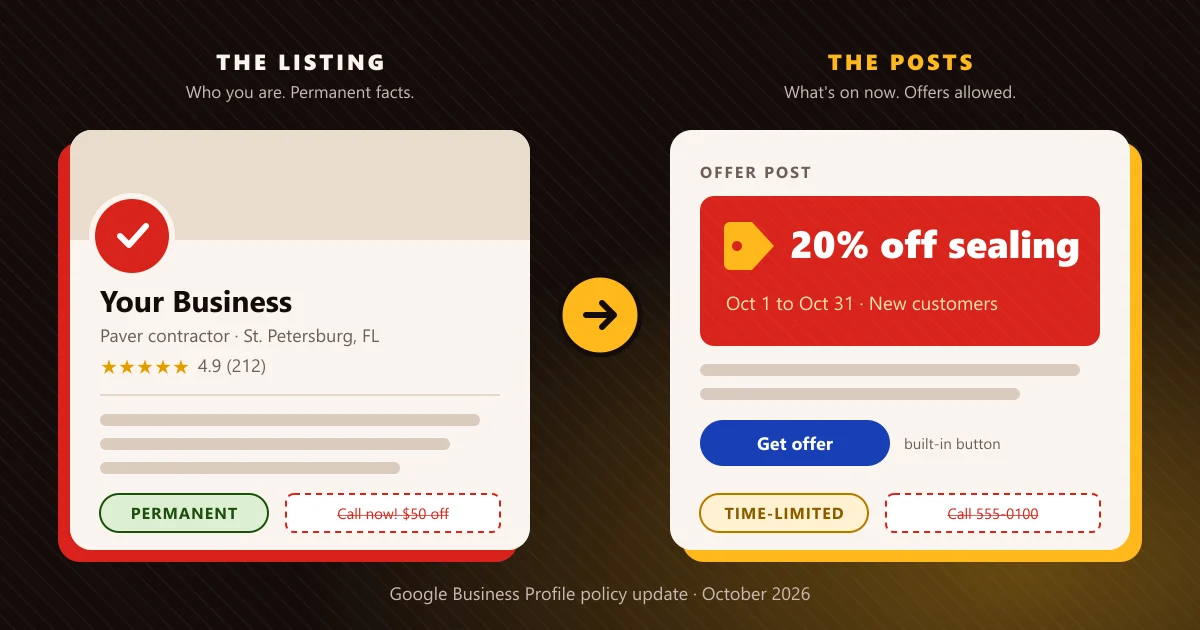
The new wording separates the listing from Posts. In the listing, Google prohibits promotional or commercial content that includes time-bound promotions, pricing, or direct calls to action. In Posts, Google prohibits email addresses, phone numbers, social media links, and links to websites unrelated to the business. Then it makes the key point: offers and updates that may look promotional are otherwise permitted in Posts.
What it means
Local businesses do not need to stop posting offers. They do need to stop treating every editable field on the profile as free advertising space.
Google wants the core listing to describe the business’s permanent identity. Current deals belong in Posts, where they can appear as time-sensitive updates rather than permanent facts.
Search Engine Roundtable reported the policy change on October 6, 2026, after before-and-after screenshots were shared by Hiroko Imai. Google’s live policy page now carries the merchant language. There is no published enforcement date in the policy and no announcement explaining how existing content will be handled.
Where each kind of message belongs now
Sort every message on the profile by its job. Permanent identity goes in the listing; timely marketing goes in Posts; a few things don’t belong in either.
Business category, core services, service area, specialties
Listing
Stable facts Google can rely on after any promotion ends.
“October special,” “this week only,” seasonal discounts
Post
Time-bound promotions are named for the listing. Posts still allow offers.
“Call now,” “book today,” “buy before midnight” in the description
Remove
Direct calls to action are named. The profile’s action buttons do this job.
Phone numbers, emails or social links typed into a Post
Remove
Prohibited in Posts. Point the built-in button at your own site.
Standard service prices or a menu price list
Unclear
Google hasn’t said how standing prices are treated. Review and document.
Your listing should answer “Who are you?”, not “What is on sale?”
Think of the listing as the durable record Google can rely on tomorrow, next month, and after the promotion ends. A clean business description explains what the company does, whom it serves, where it operates, and what makes the service relevant. It should not become a rotating coupon.
The three categories Google names are practical warning signs:
- Time-bound promotions. Phrases such as “October special,” “this week only,” or “offer ends Friday” do not define the business. They expire, so they belong in a Post.
- Pricing used as promotional copy. A price or discount pushed into general listing text now deserves review. Google names pricing as part of promotional or commercial content it does not want in the listing.
- Direct calls to action. Instructions such as “call now,” “book today,” or “buy before midnight” push the visitor toward a transaction instead of describing the business.
The policy does not define “listing” field by field. It does not say whether the term covers only the business description or every editable surface, including products and services. It also does not explain how standing menu prices or standard service prices will be treated. Anyone presenting a complete field-by-field enforcement map is filling gaps Google has not filled.
Start with the clearest risk. That uncertainty is not an excuse to ignore the update. Begin with promotional copy placed in permanent free-text fields: save a dated copy of the old text, revise it to stable business facts, and keep a record of what changed.
Posts can still promote an offer

Posts remain the proper home for timely marketing. Google explicitly says offers and updates that may be considered promotional or commercial are otherwise permitted there. A seasonal discount, limited appointment window, event, new service, or short-term package can still be published as a Post.
The guardrail is in the details. The policy lists email addresses, phone numbers, social media links, and links to websites unrelated to the business as prohibited in Posts. The safest operating pattern is to let the Post explain the offer, use the profile’s built-in action button, and send visitors to a relevant page on the business’s own website.
That is also a better customer experience. A built-in button is easier to tap than a phone number buried in body copy. A relevant landing page can show eligibility, service area, exclusions, and expiration details without turning the permanent profile description into legal fine print.
Regulated categories have stricter rules. Google’s policy separately restricts calls to action and offers for products and services such as alcohol, gambling, tobacco, guns, regulated pharmaceuticals, adult services, and financial services. Businesses in those categories should not assume the general permission for Offer Posts overrides the restricted-content rules.
Google has not said how enforcement will work
The policy is clear enough to support an audit, but not clear enough to support predictions about mass suspensions. Here is what Google has, and has not, published:
Not published
Enforcement date
The policy page gives no start date for enforcement.
Not published
Affected profiles
No count of how many listings carry the named content.
Not explained
Older listing copy
No process for content that was live before the change.
Not stated
The penalty
Edit rejection, content removal, a feature restriction or a suspension: the page doesn’t say.
Do not turn missing details into fake certainty. A business with “Call today for $50 off” in its description has language that matches all three named risk categories. That makes cleanup sensible. It does not prove the profile will disappear tomorrow.
The practical standard is simple: act on what Google actually wrote and document the rest. If enforcement changes later, a record of the wording, screenshots, and edit dates will make troubleshooting easier than trying to remember which version was live.
Run this seven-step profile audit now

The fastest way to respond is to sort every message by its job: permanent identity belongs in the listing; timely marketing belongs in Posts.
- 1Read the business description from top to bottom. Highlight every price, discount, deadline, coupon, urgency phrase, and instruction to call, book, or buy. These are the clearest items covered by the new wording.
- 2Rewrite the description around stable facts. State the business category, core services, service area, experience, specialties, and other claims that will still be true after the current promotion ends. Avoid stuffing locations or keywords that are not part of the real-world business identity.
- 3Review other editable listing fields cautiously. The policy does not give a field-by-field map, so inspect service and product text for the same three patterns. Prioritize obvious promotional copy rather than deleting useful factual information without a reason.
- 4Move live promotions into Posts. Create an Offer or Update Post with the actual benefit, eligibility, start and end dates, and a relevant destination. Do not simply erase a useful campaign; put it in the surface Google still allows for promotions.
- 5Clean the Post body. Remove phone numbers, email addresses, social-media links, and unrelated external links. Use the built-in action button and point it to a page on the business’s own site that directly supports the offer.
- 6Check regulated-content restrictions. If the business sells a regulated product or service, review the separate restricted-content rules before publishing any offer or call to action.
- 7Save evidence and monitor. Capture the before-and-after text, note the edit date, and watch for rejected edits, removed content, or notifications in the profile. Google has not explained how older content will be treated, so records matter.
A clean separation is better marketing, not weaker marketing
This policy update is easy to read as Google taking away another promotional tool. The more useful reading is that Google is forcing better content architecture.
The permanent listing should win trust quickly: this is who we are, this is what we do, and this is where we do it. Posts should create freshness: this is what changed, what is available now, and what a customer can do next. When one block of copy tries to perform both jobs, it becomes stale, confusing, and harder for Google to treat as reliable business information.
Cleaner permanent facts also support visibility beyond the profile. Consistent descriptions, services, hours, and location information give Google Search, Maps, and AI systems fewer conflicting versions to reconcile. That is the same foundation local businesses need to be cited accurately in AI answers: clear facts, repeated consistently across trustworthy sources.
The move is not to stop promoting. It is to put each message where it belongs.
Sources
- support.google.comGoogle Business Profile Help: Prohibited & restricted contentThe current policy page. See Advertising & solicitation, and Restricted content.
- seroundtable.comSearch Engine Roundtable: Updated Google Maps Policy: What Merchants Can’t Post In Listings Or PostsOctober 6, 2026.
- relevantaudience.comRelevant Audience: Google Business Profile policy now bans time-bound promotions and pricing in listingsOctober 8, 2026. Analysis of what the policy states and leaves unanswered.

About the author
HotPepper Agency is a local SEO and AI SEO agency in St. Petersburg, FL and Marietta, GA, led by Chris Romero. We have been ranking local businesses since 2006, and now we work to get them named in AI answers too.