

On this page
Key takeaways
- From October 12, Google Ads can pull promotions from a website and show them as promotion assets in Search and Performance Max.
- It is on by default at the account level. Stopping it takes action.
- One clean, evergreen offer? Leave it on and audit. Seasonal, conditional or regulated offers? Opt out before Oct 12.
Google is turning on automated promotions by default on Oct 12
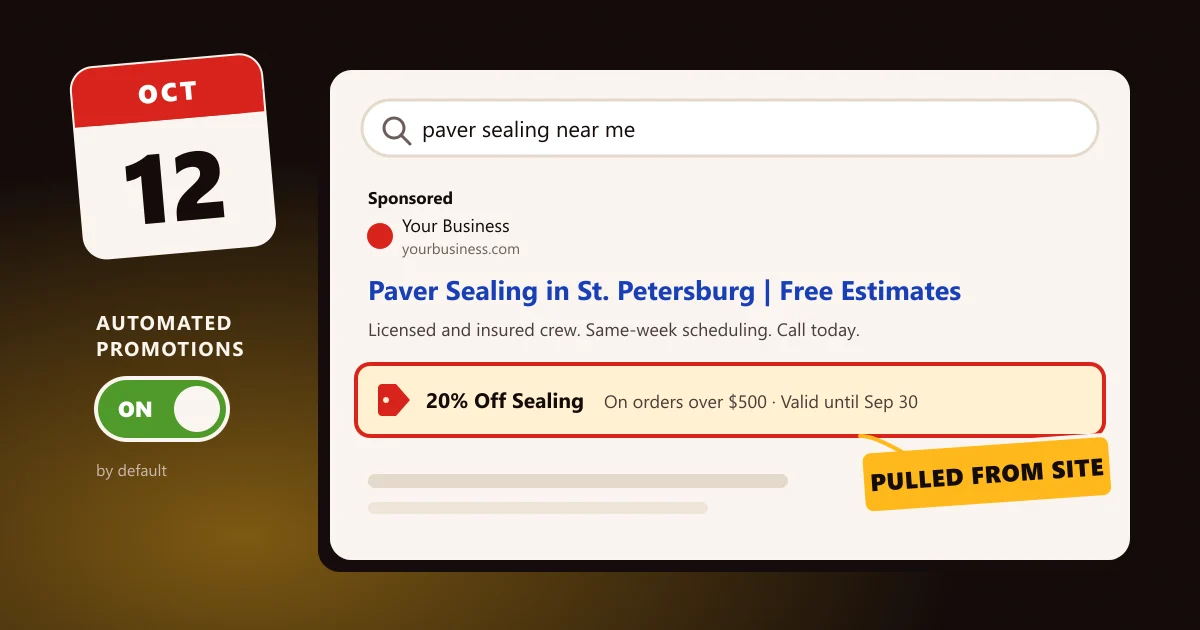
Starting October 12, Google Ads will begin pulling promotions directly from advertisers' websites and showing them as promotion assets in Search and Performance Max campaigns.
If you run Google Ads and your website mentions a discount, a free consultation, a seasonal special, or any other offer, Google may turn that text into a live ad extension, without you creating it, approving the wording, or setting an end date yourself.
The default
The setting is on by default at the account level. No action is required for Google to start doing this in your account; action is required if you want it to stop.
This is part of a broader pattern. Google has been steadily moving budget, placements, and now creative elements toward automation. Promotion assets themselves are not new. Advertisers have been able to create them manually for years, and a good promotion asset can lift click-through rate by giving searchers a concrete reason to click now. What is new is the source and the default: Google is now sourcing the copy from your website and opting every eligible account in.
Automation helps when offers are simple, hurts when they are not
For a business running one clean, evergreen offer (say, “Free estimates” or “10% off first service” with no conditions attached), automated promotions may actually help. Plenty of advertisers never got around to creating a promotion asset at all, and Google surfacing a real offer from their site is better than no asset. The ad gets more specific, the searcher gets a clearer reason to click, and nobody had to build anything.
The problems start where most real-world promotions live: in the conditions.
- Expired offers. The banner on your homepage is from last month's sale and nobody took it down.
- Conditional offers. The discount requires a minimum purchase, a first-time-customer status, or a specific service area that the ad will not explain.
- Compliance-sensitive offers. Your industry has rules about what you can claim in advertising, and the website phrasing was written for the website, not for an ad.
- Wording drift. The website says “up to 20% off” and the ad asset presents it as a flat 20%.
In each case, the risk is not theoretical. The promotion runs in your ad, under your business name, to your customers. If the terms do not match what a customer finds when they call or check out, you own the mismatch, not Google's scraper.
Leave it on or turn it off: the per-client call
There is no single right answer for every account, which is exactly why a default-on rollout deserves a deliberate decision instead of an inherited one. Our guidance splits on offer complexity:
One evergreen offer, no conditions, current on the site
Leave on, then audit
Likely a free CTR lift; verify wording once live.
Seasonal or expiring promotions
Opt out before Oct 12
Expired assets damage trust and can violate policy.
Conditional offers (minimums, first-time only, geo limits)
Opt out before Oct 12
Auto-pulled assets strip the context; create manual assets instead.
Regulated or compliance-reviewed ad claims
Opt out before Oct 12
Website copy was not cleared as ad copy.
No promotions on the website at all
No action needed
Nothing to pull; revisit if you add offers later.
If you opt out, you are not giving up promotion assets. You can, and should, still create them manually, with the exact wording, terms, and schedule you intend. Opting out of the automated version only means Google does not write them for you.
How to opt out before Oct 12

The opt-out lives at the account level, so it must be set in each Google Ads account you manage. It takes under a minute per account:
- 1Go to Campaigns in the left navigation.
- 2Open Assets, then scroll to Account-level automated assets.
- 3Open Advanced settings (the gear/expand control on that section).
- 4Find Automated Promotions and set it to Off.
- 5Repeat for every account. MCC-level settings do not cascade this choice to child accounts in a way you should rely on without verifying each one.
Timing matters. Do this before October 12 if you intend to opt out. Turning it off afterward still works, but any assets Google created in the meantime may already have served, so the pre-launch opt-out is the clean one.
If you leave it on, audit what Google publishes

Leaving the feature on is a legitimate choice for simple offers, but it converts a one-time setup into a small ongoing obligation. For the first month after October 12, we recommend a weekly five-minute check:
Step 1
Check
Go to Assets → Promotion and filter by source to see what was auto-created.
Step 2
Verify
Click through each asset to compare its wording against the live offer and its terms on your website.
Step 3
Fix
Pause or remove anything expired, conditional, or misstated, and replace it with a manual asset carrying the correct terms.
Step 4
Clean
Check your homepage and landing pages for stale banners. Whatever is on the site is what Google may pull next.
After the first month, fold the check into your regular monthly ads review. The goal is simple: a customer who clicks your ad should find exactly the offer the ad promised.
The 10-minute pre-Oct 12 checklist
- Step1
Inventory
- Every promotion, discount, or special currently mentioned anywhere on your website: homepage banners, popups, service pages, blog posts.
- Step2
Decide
- For each Google Ads account: leave-on-and-audit, or opt-out.
- Decide per account, not per business, if you run multiple accounts.
- Step3
Opt out
- Complete the opt-out steps above in every account you are turning off.
- Screenshot or note the setting for your records.
- Step4
Clean up
- Remove or update any expired or conditional banners on the website regardless of your ads decision. Stale site promos are a conversion problem even without Google amplifying them.
- Step5
Calendar an audit
- For October 13 and again a week later, to review whatever Google published in any account left on.
What HotPepper is doing for clients
We are reviewing every client Google Ads account we manage this week, before the October 12 start date. For accounts with conditional, seasonal, or compliance-sensitive offers, our default is to opt out and replace any worthwhile promotion with a manually created asset that carries the correct wording and schedule. For accounts with a single clean evergreen offer, we will leave the feature on, audit what Google publishes in the first week, and report anything that needs correcting.
If you run your own Google Ads, or your current agency has not mentioned this change, run the checklist above this week. It is a ten-minute task now, or a customer-conversation problem later. And if you would like a second set of eyes on your account before the deadline, reach out through our contact page and mention this post; we will tell you plainly whether we would leave it on or turn it off in your account, and why.

About the author
HotPepper Agency is a local SEO and AI SEO agency in St. Petersburg, FL and Marietta, GA, led by Chris Romero. We have been ranking local businesses since 2015, and now we work to get them named in AI answers too.